
96% of potential clients use a search engine before ever picking up the phone to call a lawyer — which means your law firm website isn't just a digital business card, it's your most powerful client acquisition tool. Get it right, and it works around the clock converting strangers into consultations. Get it wrong, and you're handing those clients directly to your competitors.
The law firm website builder market has never been more crowded. Legal-specific platforms, general-purpose drag-and-drop builders, and AI-powered tools all promise to solve your online presence problem — but they come with wildly different price tags, feature sets, and long-term consequences. Most comparison articles won't tell you that. They're thinly veiled advertisements dressed up as objective reviews.
This guide is different. We've cut through the marketing noise to evaluate every major category of law firm website builder by true cost, SEO capability, compliance tools, client intake functionality, and scalability. Whether you're a solo practitioner launching your first site or a growing firm ready to upgrade, you'll finish this article knowing exactly which platform matches your actual needs — and which ones to avoid.
Why Your Law Firm Website Builder Choice Matters More Than You Think
A law firm website carries responsibilities that no generic small business site ever will. When someone searches for legal help, they're often frightened, overwhelmed, or facing one of the most consequential moments of their life. Your website must do more than look professional — it must capture client intake efficiently, comply with your state bar's advertising rules, meet ADA and WCAG accessibility standards, and project the kind of trust that convinces a stressed potential client to pick up the phone. That's a fundamentally different design and technical challenge than selling handmade candles or booking yoga classes.
The platform you choose today shapes your firm's digital future in ways that aren't immediately obvious. The wrong choice can trap you in vendor lock-in, where migrating your content and preserving your hard-earned search rankings becomes a costly, painful process. It can saddle you with poor SEO architecture that quietly suppresses your visibility in local search results. It can hit a scalability ceiling just as your firm starts growing — forcing an expensive rebuild at the worst possible time.
When evaluating any platform, look beyond the advertised monthly price. Total cost of ownership — including domain registration, premium templates, plugin subscriptions, content creation, and maintenance — is what actually determines value. You'll also want to assess SEO architecture, integration with practice management software, and whether you retain full data portability if you ever need to switch.
And if your site isn't optimized for mobile, none of the rest matters. The majority of legal searches now happen on smartphones, and Google's Core Web Vitals directly influence where your site ranks. Mobile performance isn't a nice-to-have — it's the baseline.
The Three Categories of Law Firm Website Builders

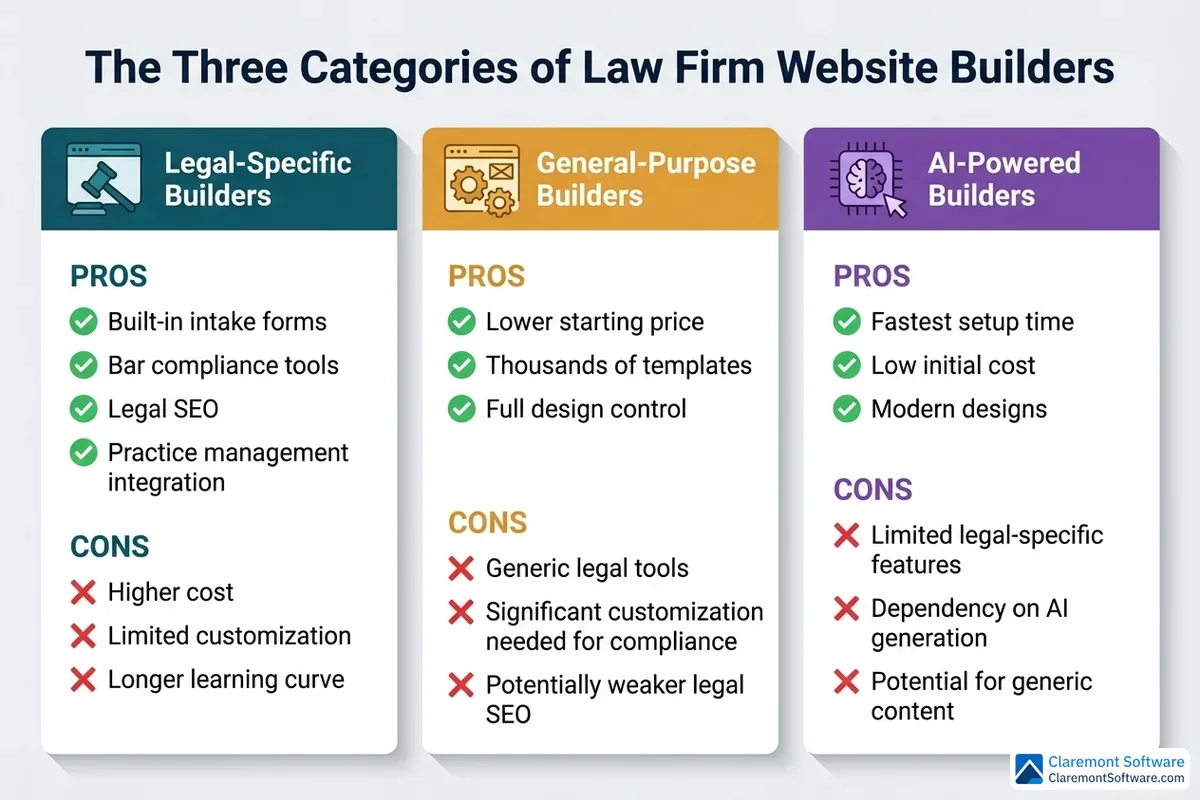
Before you can evaluate a single platform, you need to understand the landscape you're navigating. Law firm website builders don't all come from the same mold — and choosing the wrong category of tool is a more fundamental mistake than choosing the wrong specific product within a category. There are three distinct types of platforms competing for your attention, and each represents a different set of trade-offs.
Legal-specific website builders are purpose-built for attorneys from the ground up. Rather than adapting a general tool to fit legal needs, these platforms are engineered around them. Expect built-in client intake forms, appointment scheduling, payment collection, and direct integration with practice management software — all configured with law firms in mind. Templates are pre-structured with the pages attorneys actually need: practice area pages, attorney profiles, and contact forms that capture case details rather than just names and email addresses. Many include legal schema markup to help search engines understand your content, and some offer bar-compliant disclaimer language baked into their designs. The trade-off is a narrower design palette and the ever-present risk of vendor lock-in.
General-purpose website builders take the opposite approach. These platforms prioritize flexibility and affordability, offering thousands of templates and expansive app marketplaces that can technically support almost any type of website — including a law firm's. The self-hosted open-source route, which powers over 42% of all websites globally, gives you maximum control over SEO, design, and functionality. The catch is that none of the legal-specific features come pre-configured. Intake workflows, bar-compliant disclaimers, and legal schema markup all require manual setup, third-party plugins, or developer involvement.
AI-powered website builders are the newest entrant, promising to generate a complete, professional-looking law firm website from a simple text prompt in a matter of minutes. The speed is genuinely impressive. The concerns, however, are equally real — particularly around whether AI-generated legal content is accurate, bar-compliant, and persuasive enough to actually convert anxious visitors into paying clients.
Understanding which category aligns with your firm's size, budget, and technical comfort level is the single most important decision you'll make before comparing any individual platform.
Essential Features Every Law Firm Website Platform Must Have
Not every website builder is equipped to handle the unique demands of a law firm — and the gap between "good enough" and "purpose-built" becomes painfully obvious the moment a potential client can't submit an intake form on their phone or your site gets flagged for an accessibility violation. Before comparing specific platforms, it's worth establishing a clear baseline: these are the features that aren't optional.
Structured Client Intake Integration
A basic contact form that collects a name and email address isn't client intake — it's a missed opportunity. A properly configured law firm website needs intake forms that capture case-specific details, route leads to the right attorney or practice area, and connect directly to your CRM or practice management system. When a prospective client submits a form at 11 PM on a Sunday, that lead should flow automatically into your workflow, not sit in an unmonitored inbox until Monday morning. The difference between a structured intake system and a generic contact form is often the difference between a signed client and a lost one.
Built-In SEO Architecture
Search visibility isn't something you bolt on after the fact — it has to be baked into the platform's foundation. Look for clean, customizable URL structures, fast page load speeds, and native support for schema markup tailored to legal services. Equally important is the ability to build out dedicated practice area pages and publish regular blog content without fighting the platform's limitations. These aren't advanced SEO tactics; they're the baseline requirements for competing in local legal search.
Security Standards That Meet Ethical Obligations
SSL certificates and HTTPS enforcement are non-negotiable — both for Google rankings and for your ethical obligations around client confidentiality. Any platform worth considering should provide SSL as a standard feature, not an upsell. Beyond the certificate itself, evaluate how the platform handles data storage, form submission security, and software updates. A security vulnerability on your website isn't just a technical problem; it's a potential bar complaint.
ADA and WCAG Accessibility Compliance
The Americans with Disabilities Act applies to websites, and law firms are not exempt. A site that isn't accessible to users with visual, auditory, or motor impairments exposes your firm to legal liability — an irony no attorney wants to face. Look for platforms that are built to meet Web Content Accessibility Guidelines (WCAG) standards, including proper heading structures, alt text support for images, keyboard navigation, and sufficient color contrast ratios.
Mobile-First Responsive Design
Given that the majority of legal searches now happen on smartphones, a site that performs beautifully on a desktop but struggles on mobile is effectively invisible to a large portion of your potential clients. Responsive design is the minimum standard; what you actually need is a platform that passes Google's Core Web Vitals benchmarks on real mobile devices — measuring load speed, visual stability, and interactivity under real-world conditions. Ask to see mobile performance scores before committing to any platform.

Legal-Specific Platforms: Purpose-Built for Attorneys

If you've determined that a legal-specific platform is the right category for your firm, you're choosing the path of least friction — and that's not a criticism. For attorneys who want a professional, functional website without spending weeks configuring plugins or hiring a developer, purpose-built legal platforms offer something genuinely valuable: a system where everything is already speaking the same language.
An Integrated Ecosystem, Not a Collection of Parts
The defining advantage of legal-specific platforms is integration depth. Rather than stitching together a website builder, a separate intake form tool, a third-party scheduling app, and a payment processor — and hoping they all communicate reliably — these platforms bundle those capabilities into a single ecosystem designed around how law firms actually operate. A prospective client can find your site, read about your practice areas, schedule a consultation, complete a structured intake form, and pay a retainer without ever leaving your website or entering a different system. That seamless experience isn't just convenient for clients; it reduces the administrative burden on your staff and closes the gaps where leads typically fall through.
Templates Built Around Legal Page Structures
General-purpose builders offer thousands of templates, but most of them require significant restructuring before they resemble a credible law firm website. Legal-specific platforms take a different approach, offering curated template libraries — typically ranging from three to fifteen themes — that are pre-architected around the pages attorneys actually need. Attorney profile pages, practice area sections, a blog structured for legal content, and contact pages with case-detail fields are built into the template from the start rather than retrofitted. The design options are narrower, but the starting point is far more relevant.
SEO Features Tailored to Legal Search
Many legal-specific platforms include proprietary SEO tools that go beyond what general-purpose builders offer out of the box. Legal schema markup — the structured data that helps search engines understand that your page describes a law firm, a specific practice area, or an attorney profile — is often built into the platform's architecture rather than requiring a separate plugin. Some platforms include AI-assisted writing tools designed specifically for legal content, helping attorneys draft practice area pages and blog posts that are pre-structured for local legal search queries. These aren't magic ranking solutions, but they do lower the barrier to producing the kind of content that search engines reward.
The Trade-Offs You Need to Understand
The convenience of a purpose-built platform comes with real constraints. Design flexibility is limited compared to general-purpose builders — if your firm has a strong brand identity or specific visual requirements, you may find the available templates feel restrictive. More significantly, vendor lock-in is a genuine risk. If your firm grows beyond what the platform can support, or if the provider raises prices substantially, migrating your content while preserving your SEO equity is a complex and often expensive undertaking.
Pricing for legal-specific platforms typically ranges from roughly $80 to $300 or more per month, depending on the feature tier. That range reflects meaningful differences in what's included — some plans bundle content creation support and advanced analytics, while entry-level tiers may limit the number of pages or integrations available. Pay close attention to domain policies as well: some platforms support custom domains from the start, while others default to a subdomain format that signals to potential clients — and to search engines — that your firm hasn't fully invested in its online presence. A custom domain isn't a luxury; it's a baseline credibility requirement.
General-Purpose Builders: Flexibility at a Lower Price Point
For attorneys who aren't ready to commit to a legal-specific platform — or who simply want more control over their site's design and long-term architecture — general-purpose website builders represent a compelling alternative. The trade-off is straightforward: you gain flexibility and lower entry costs, but you take on more responsibility for configuring the legal-specific features that purpose-built platforms include by default.
Two Distinct Paths Under One Category
General-purpose builders split into two meaningful camps. The first is the self-hosted, open-source CMS route — the approach that powers over 42% of all websites globally. This path offers unmatched flexibility and SEO control: you can customize virtually every technical element of your site, install any plugin from a vast ecosystem, and maintain complete ownership of your data and infrastructure. The catch is that this level of control requires either meaningful technical knowledge or a developer relationship to handle setup, security updates, and ongoing maintenance. For a solo practitioner who wants to focus on practicing law rather than managing a web server, this path can quickly become a distraction.
The second camp is managed general-purpose builders — drag-and-drop platforms with thousands of templates, intuitive editors, and extensive app marketplaces. These are significantly easier to set up and maintain without technical expertise, and their template libraries are broad enough that a credible law firm site is absolutely achievable with the right customization. The limitation is that legal-specific functionality — structured intake forms, practice management integrations, appointment scheduling — typically requires third-party plugins or workarounds rather than native features.
Understanding the True Cost
The advertised price of $10 to $50 per month for a general-purpose builder is rarely the actual cost of running a professional law firm website. Premium templates designed for professional services firms, intake form plugins, scheduling tools, security certificates on certain platforms, and ongoing maintenance hours all accumulate quickly. A realistic budget for a properly configured general-purpose law firm site often lands closer to the entry tier of legal-specific platforms once you account for the full stack of add-ons required.
The Portability Advantage
Where general-purpose builders genuinely outperform their legal-specific counterparts is data portability. Your content, your domain, and your SEO equity belong to you — not to the platform. If your firm's needs evolve, you can migrate to a more powerful solution without the painful content extraction process that legal-specific platforms often impose. For firms thinking long-term, that freedom has real strategic value.
AI-Powered Website Builders: The New Frontier for Law Firms
The newest category of law firm website builders promises something genuinely appealing: describe your firm in a text prompt, and walk away with a complete website in minutes. For attorneys who have been dreading the time investment of building a site from scratch, that pitch is understandably attractive. The setup time is dramatically reduced, the upfront cost is often lower, and the barrier to getting something live and functional has never been lower.
But speed and a functional website are not the same thing as a converting website — and that distinction matters enormously in a legal context.
Where AI-Generated Sites Fall Short for Law Firms
The core problem with fully AI-generated law firm websites isn't the design. It's the content. Generic AI copy tends to produce text that sounds plausible but lacks the specificity, local relevance, and authentic voice that actually persuades someone in a stressful legal situation to pick up the phone. More critically, AI-generated legal content can contain inaccuracies — and inaccurate legal information published under your name creates both ethical and reputational exposure. State bar advertising rules add another layer of complexity that AI tools are not reliably equipped to navigate.
Where AI Actually Adds Value
The more practical application isn't a fully AI-generated site — it's AI writing assistance integrated into a thoughtful website strategy. Using AI tools to accelerate the drafting of practice area pages, blog posts, or attorney bios, then refining that content with attorney review, is a genuinely useful workflow. The technology works best as an accelerator, not a replacement for strategic thinking.
Every piece of AI-generated content published on your firm's website should be reviewed by a licensed attorney before it goes live — for accuracy, for tone, and for compliance with your state bar's advertising guidelines. That step isn't optional.
The True Cost of a Law Firm Website: Beyond the Monthly Fee

The advertised monthly price is the number that gets featured in comparison tables and marketing headlines. It is rarely the number that appears on your annual accounting statement.
Building a credible, functional law firm website involves a stack of costs that most platform comparison articles quietly ignore. Domain registration runs $10–20 per year at minimum, and premium domain extensions or competitive legal keywords can push that higher. Many platforms charge separately for SSL certificates, though some bundle them — a distinction worth confirming before you sign up. Premium templates designed to look professional in a legal context often carry one-time fees of $50–200 on top of your monthly subscription. Then come the plugins: structured intake forms, appointment scheduling tools, and practice management integrations each add their own recurring subscription costs on general-purpose platforms.
The Bundling Trade-Off
Legal-specific platforms tend to bundle more of these features into a single monthly price, which makes cost comparison genuinely difficult. A platform charging $150 per month that includes intake forms, scheduling, and SSL may actually be less expensive than a $25-per-month general-purpose builder once you've added the equivalent functionality through third-party tools. Run the full stack comparison, not just the headline price.
The Subdomain Problem
One cost that's easy to avoid but surprisingly common: using a platform-assigned subdomain instead of a custom domain. Operating your firm's website at something like yourfirm.builderplatform.com signals to potential clients — consciously or not — that you haven't invested in your own practice. Custom domains are inexpensive and non-negotiable for professional credibility.
Content Is an Ongoing Expense
A website is not a one-time project. A blog section with posts dated two years ago actively undermines your credibility rather than building it. Factor ongoing content creation into your budget from the start — whether that means staff time, a freelance legal writer, or a managed content service.
The Migration Cost Nobody Mentions
The most significant hidden cost is the one you pay when you choose the wrong platform and need to leave it. Switching platforms mid-growth can cost anywhere from $2,000 to $10,000 or more when you account for redesign work, content transfer, SEO redirect mapping, and the temporary ranking losses that often accompany a migration. Choosing a platform with strong data portability from the beginning isn't just a technical preference — it's financial risk management.

SEO Showdown: Do Legal-Specific Builders Actually Rank Better?
The short answer is: not necessarily — and understanding why will save you from making a platform decision based on marketing claims rather than actual search performance.
Legal-specific builders do offer genuine SEO advantages out of the box. Many include pre-configured legal schema markup (the structured data that helps Google understand your site is a law firm offering specific services in a specific location), local SEO features designed around attorney search patterns, and page structures that mirror what well-ranking law firm sites already look like. For a solo practitioner with no SEO background, that head start has real value — it reduces the number of technical decisions you need to make correctly before your site has any chance of appearing in search results.
But the Head Start Has a Ceiling
General-purpose platforms — particularly self-hosted CMS solutions — offer significantly more granular SEO control once you're ready to use it. Custom code access, advanced plugin ecosystems, full control over URL structures, and the ability to implement technical SEO configurations that legal-specific builders simply don't expose to users. For firms serious about competing in high-value legal search markets, that ceiling matters.
Here's the more important truth, though: the platform matters far less than the content strategy. A thoroughly researched, locally relevant practice area page published on a general-purpose builder will consistently outrank a thin, templated page on a platform marketed as "SEO-optimized for attorneys." Search engines rank content that answers searcher intent — not platforms with impressive feature lists.
What to Actually Evaluate
When comparing platforms on SEO capability, focus on these specific factors rather than vague claims about "built-in SEO":
- Page speed scores — run candidate platforms through Google PageSpeed Insights on mobile, not just desktop
- Mobile performance — Google's Core Web Vitals benchmarks directly influence rankings, and the majority of legal searches now happen on smartphones
- URL structure control — can you create clean, descriptive URLs like /practice-areas/criminal-defense/ rather than platform-generated strings?
- Meta tag customization — full control over title tags and meta descriptions for every page
- XML sitemap generation — automatic and accurate, so search engines can crawl your full site
- Local schema markup support — critical for appearing in local legal search results and Google's map pack
The Content Infrastructure Question
Firms serious about long-term SEO should also evaluate how easy each platform makes the ongoing work of content creation. Can you quickly build out location-specific practice area pages as your firm expands into new markets? Is the blog editor functional enough that you'll actually use it regularly? Does the platform integrate cleanly with Google Analytics and Google Search Console so you can track what's working? These operational questions predict your real-world SEO outcomes better than any feature checklist.
Scalability: From Solo Practice to Multi-Attorney Firm

Your website platform needs to grow with your firm — and the scalability requirements of a solo practitioner look almost nothing like those of a ten-attorney operation.
Solo Practitioners: Start Simple, Start Right
For a solo attorney, the priority is getting a credible, functional site live without overcomplicating the process or overextending the budget. A clean template, a custom domain, a solid practice area page, and a working intake form will outperform an elaborate site that never gets finished or consistently updated. Whether you choose a legal-specific builder or a streamlined general-purpose platform, simplicity is a feature at this stage — not a compromise.
Small Firms: When Complexity Becomes Necessary
As your firm grows to two or more attorneys, your website's structural requirements shift meaningfully. You now need individual attorney profile pages that build personal credibility, multiple practice area sections that can be expanded independently, and — critically — intake form routing that sends the right leads to the right attorney rather than dropping everything into a single inbox. Platforms that handle this routing natively are worth the premium over solutions that require manual workarounds.
Growing Firms: Infrastructure Over Aesthetics
Firms expanding into new practice areas or multiple locations need platforms that support that growth without requiring a full rebuild each time. The ability to add targeted landing pages, integrate deeply with practice management software, and support multi-location local SEO becomes the deciding factor at this stage.
Regardless of where your firm sits today, prioritize platforms with strong data portability. The ability to migrate cleanly — preserving your content and SEO equity — protects your investment as your needs evolve.
Claremont Software builds scalable solutions specifically designed to grow alongside your practice, so you never find yourself constrained by a platform ceiling at exactly the moment your firm needs to accelerate.
How to Choose the Right Law Firm Website Builder: A Decision Framework
By this point in your evaluation, you've worked through the categories, the cost realities, the SEO trade-offs, and the scalability questions. Now it's time to convert that knowledge into a decision. This five-step framework cuts through the noise and gets you to a confident choice.
Step 1: Define Your Starting Constraints
Before you evaluate a single platform, get honest about three variables: your firm's current size, your realistic monthly budget (including the add-ons, not just the advertised price), and your technical comfort level. A solo practitioner with no web experience and a $100/month ceiling is looking at a completely different shortlist than a five-attorney firm with a dedicated administrator and a $500/month budget. Defining these constraints upfront immediately narrows the field from a dozen options to two or three realistic candidates.
Step 2: Build Your Non-Negotiables List
Write down the features your firm genuinely cannot operate without — client intake forms, appointment scheduling, payment processing, a specific practice management integration — and eliminate any platform that doesn't support them natively or through a reliable integration. Don't rationalize workarounds for core functionality. If a platform can't handle your intake workflow on day one, it won't handle it better six months in.
Step 3: Stress-Test the SEO Capabilities
Run each candidate platform through Google PageSpeed Insights on mobile. Check whether you have full control over URL structures, meta tags, and schema markup. Confirm the blog editor is functional enough that you'll actually publish content consistently. Platforms that make SEO easy to maintain are worth more than platforms that claim to handle it automatically.
Step 4: Use the Free Trial Like a Real User
Don't just browse the demo — build something. Add a practice area page, update an attorney bio, and publish a test blog post. The friction you feel during a free trial is the friction you'll feel every time you need to update your site. If routine tasks feel cumbersome now, they'll feel worse when you're busy.
Step 5: Confirm Your Exit Rights
Before committing, verify that you can export your content, retain your custom domain, and implement proper redirects if you ever need to migrate. Vendor lock-in is the hidden cost that turns a reasonable platform decision into an expensive mistake two years later. Claremont Software builds every client site with full data portability as a baseline — because your content and your SEO equity belong to your firm, not your platform.

Conclusion
Choosing a law firm website builder is ultimately a business decision — one with consequences that compound over time. The platform that saves you $50 a month today can cost you thousands in migration fees, lost rankings, and missed client opportunities tomorrow.
No single platform wins across every category. Legal-specific builders offer the fastest path to a compliant, functional site. General-purpose and self-hosted solutions offer more control and long-term flexibility. AI tools accelerate content creation but cannot replace attorney judgment. What matters most is matching the right category to your firm's actual situation — not the situation you hope to be in someday.
Whatever platform you choose, hold it to the same standard: strong SEO architecture, mobile performance that passes real-world benchmarks, structured client intake, and the freedom to take your content with you if your needs change.
If you're ready to build a site that grows with your practice rather than constraining it, Claremont Software specializes in scalable law firm websites built with full data portability from day one. Your next client is already searching — make sure they find you.
Frequently Asked Questions
How much does a law firm website builder cost per month?
Law firm website builder costs vary widely depending on the type of platform. Legal-specific platforms designed for attorneys typically range from $80 to $300+ per month, bundling features like intake forms, scheduling, and practice management integrations. General-purpose builders start much lower — often $10 to $50 per month — but the true cost climbs when you add premium templates, legal plugins, and security tools. Don't forget to budget for domain registration, content creation, and ongoing maintenance. Always calculate the total cost of ownership, not just the advertised monthly price, before committing to any platform.
Can I build a law firm website without any coding or design experience?
Yes — many modern website builders are designed specifically for non-technical users. Legal-specific platforms and general-purpose drag-and-drop builders allow you to customize templates, add pages, and manage content without writing a single line of code. AI-powered builders can even generate a basic site from a text prompt in minutes. That said, the easier a platform is to use out of the box, the more limited your customization options may be. If you want a highly tailored site with advanced SEO and intake workflows, working with a professional web designer — even just for the initial setup — is worth considering.
Do I need a legal-specific website builder or can I use a general-purpose platform?
It depends on your firm's priorities. Legal-specific builders come pre-loaded with attorney-focused features like bar-compliant templates, structured intake forms, appointment scheduling, and legal schema markup — saving significant setup time. General-purpose platforms offer more design flexibility and lower entry costs, but you'll need to manually configure legal disclaimers, intake workflows, and SEO settings, often through third-party plugins. Solo practitioners and small firms that want a fast, compliant launch often benefit from legal-specific platforms. Firms with more technical resources or unique design needs may find a general-purpose platform gives them greater long-term control.
What pages should every law firm website include?
At minimum, every law firm website should include a Homepage, an About page (firm overview and attorney bios), Practice Area pages (one dedicated page per area of law you handle), a Contact page with an intake form, and a Blog or Resources section for ongoing content. Attorney Profile pages are essential for building trust, especially in multi-attorney firms. Many firms also benefit from a Testimonials or Case Results page, a FAQ page, and location-specific landing pages if they serve multiple geographic areas. Each practice area page should be individually optimized for local search to maximize visibility in your target markets.
Are AI-powered website builders good enough for a law firm?
AI-powered builders can generate a basic law firm site quickly and affordably, making them appealing for solo practitioners on tight budgets. However, AI-generated legal content carries real risks — generic copy may not accurately reflect your practice, and it may fail to comply with your state bar's advertising rules. AI tools work best as accelerators for content drafts, not as a replacement for a thoughtful website strategy. Any AI-generated content published on a law firm site should be reviewed and approved by a licensed attorney before going live. Treat AI as a helpful starting point, not a finished product.
How do I make sure my law firm website complies with state bar advertising rules?
State bar associations have specific and varying requirements for attorney websites, which can include mandatory disclaimers, restrictions on certain claims (like 'best' or 'expert'), and rules around client testimonials and case results. To stay compliant, start by reviewing your specific state bar's advertising guidelines — these are typically published on the bar's official website. Use templates and platforms that include built-in legal disclaimer fields. Have a licensed attorney review all website copy before publishing, especially any AI-generated content. Revisit your site's content periodically, as bar advertising rules can change and your website must remain current.
Should I use a free subdomain or pay for a custom domain name?
Always pay for a custom domain name. Using a free subdomain provided by a website builder — such as 'yourfirm.builderplatform.com' — signals to potential clients that you haven't invested in your own practice, which undermines trust before they've even read a word. A custom domain (like 'smithlawfirm.com') looks professional, is easier to remember, and is essential for building long-term SEO authority. Custom domains typically cost $10 to $20 per year — a negligible expense compared to the credibility cost of using a subdomain. This is one area where cutting corners is never worth it.
How long does it take to build a law firm website from scratch?
The timeline depends heavily on the platform you choose and how much content you have ready. An AI-powered builder can generate a basic site in minutes, while a legal-specific platform with pre-built templates can be configured and launched in a few days to a couple of weeks. A fully custom-designed law firm website built by a professional agency typically takes four to twelve weeks, depending on the scope, number of pages, and revision cycles. The biggest time factor is usually content — writing attorney bios, practice area descriptions, and intake workflows takes time regardless of the platform. Having your content ready before you start building will significantly speed up the process.